---
title: "Blog Header"
path: https://www.eonshowroom.eon.com/en/blog-header.html
lastModified: 2026-09-14T09:14:33.491Z
---
# Blog Header

# New blog header component makes editor live easier and looks great
See all details on the new blog header component. Cool new design and easy editing.
Published: 11 Sep 2026
Topics: Hero Component, Special Configurations
# Blog Header
The Blog Header displays the main header information for a blog article.
It is based on the existing Content Header and uses a dedicated Blog Header variant.
Unlike most components, editors do not need to add or maintain the Blog Header directly on the page. It is already included in the Blog Article template and is rendered automatically when enabled in Press & Event Details.
The content and design configuration in Press & Event Details is the single source of truth. This avoids maintaining the same article information twice.
### Blog header features
- Automatically included in the Blog Article page template.
- Uses content maintained in Press & Event Details.
- Supports optional Blog-specific headline and abstract with fallback to the standard values.
- Allows editors to control which information is shown and select the color scheme.
## Configuration
### Configuration in a nutshell
- Maintain the article information in Press & Event Details.
- Open Blog Header Config and enable Render Content to Blog Header .
- Configure the displayed elements and color scheme.
### In this how to
Quick jump to the most relevant how to topics
[Maintaining Blog Header content](https://www.eonshowroom.eon.com/en/blog-header.html#configuration)
[Enabling the Blog Header](https://www.eonshowroom.eon.com/en/blog-header.html#configuration)
[Controlling displayed information](https://www.eonshowroom.eon.com/en/blog-header.html#configuration)

#### Maintain the article information
##### Headline writing guidelines
Open Press & Event Details and maintain the required article information such as:
- Image
- Headline
- Abstract
- Tags
- Date and time
This information is also used by other Blog functionality such as article listings and related articles.
*Do not maintain the same information separately in page components.*
If the**Press & Event Details** are not visible, enable them in the corresponding CAConfig.
If the **Blog Header is missing or not rendering**, check the CAConfig and the configured Blog Header Component Resource Type, especially when using a proxy component.
**Example:** Headline using soft hyphen and force line break
## Innovative RenewableEnergy Technologies for Sustainable Communities


#### Size & HTML Tag For SEO
Each headline has two settings:
- **Size**controls the visual style (e.g. Headline 3).
- **HTML tag** defines the semantic level for SEO. When set to **default**, the SEO tag matches the selected size (e.g. Headline 3 = H3). Editors can also override this by choosing a custom tag (H1–H5, p, span).
This separation lets you control appearance independently from SEO meaning.
A good headline structure uses **one H1** as the main page title, followed by **H2 for sections** and **H3 for subsections**. H4 and H5 can add detail if needed. Headlines should follow a logical order without skipping levels, with the H1 kept short and keyword-focused. This helps search engines and users clearly understand the page content.
[Learn more about SEO headlines (NEED TO UPDATE)](#)

#### Alignment
There are two alignment options for headlines: **left** and **center**. **Left is the default** and should be used in most cases. Center can be used for design reasons, if needed.

#### Enable Info Icon
You can add an **Info Icon** directly to a headline if extra context is needed.
- **Tooltip version:** Hovering the icon shows: *“Installation usually takes 30–60 minutes.”*
- **Modal version:** Clicking the icon opens a modal with extended details: *“Our certified technicians will install the smart meter at your premises. The process is free of charge and requires access to your main fuse box.”*
**Example:** Headline with info icon
## Smart meter installation for free
[Info Icon Key: info-icon-1]
[Info Icon Aria Label: price-details]
## Free smart meter installation
[Info Icon Key: info-icon-2]
[Info Icon Aria Label: price-details-modal]
[Info Icon Content Type: Modal]
[Info Icon Modal ID: price-details]
#### Conditions of smart meter installation
[Modal ID: price-details]

#### Anchor Tag
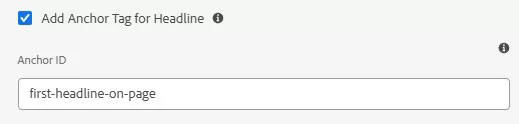
Anchors let you link directly to a headline. Add an anchor ID to the headline, then use #anchor-id in your link. Example: #smart-meter.
**Example:** Link to headline with anchor tag
[Link to first headline on this page](https://www.eonshowroom.eon.com/en/content-elements/headline-example.html#first-headline-on-page)
Headline tag set on anchor

#### Color Config
Color configuration is no longer relevant for the E.ON Brand because the number of color options has been reduced. **H1 headlines** are always displayed in **red**. All other headlines appear in **dark grey**, or in **white** when placed on dark backgrounds.